How Much Is Windows 11? Home and Pro Prices in 2026
Windows 11 Home is $139 and Pro is $199.99 at the Microsoft Store. Here is what decides the price, when the upgrade is free and which license you actually need.
On this page
Quick answer: At the Microsoft Store, Windows 11 Home costs $139 and Windows 11 Pro costs $199.99 (October 26, 2026). Upgrading an activated Home PC to Pro is cheaper than buying Pro outright, and if your PC already runs a licensed copy of Windows 10, moving to Windows 11 is free.
What you pay for Windows 11 depends on three things: the edition you pick, the license type, and where you buy it. This article covers current prices, why they differ so much, and how to pick the right license without paying for more than you need.
Current Windows 11 Prices
| Edition and channel | Price | Notes |
|---|---|---|
| Windows 11 Home, Microsoft Store | $139.00 | Download or USB |
| Windows 11 Pro, Microsoft Store | $199.99 | Download or USB |
| Windows 11 Home to Pro, Microsoft Store | About $99, shown in the Store app | Requires an activated Home install |
Prices as of October 26, 2026. Microsoft can change prices at any time, so check the Store before you buy.
Microsoft notes on its product pages that these editions are meant for PCs that need a new Windows license and meet the Windows 11 minimum system requirements. If your PC runs Windows 10, try the free upgrade first.
Is Windows 11 Free?
Yes, if you already run a licensed copy of Windows 10. A PC that meets the Windows 11 requirements and has an activated Windows 10 installation can upgrade to Windows 11 for free through Windows Update. Windows 10 Home moves to Windows 11 Home, Windows 10 Pro moves to Windows 11 Pro, and your activation carries over. Windows 10 support ended on October 14, 2025, so upgrading is also the way to keep receiving security updates.
No, for a new build or a PC without Windows. In that case you need to buy a Windows 11 license. You can install and use Windows without a key, but personalization settings stay locked and an "Activate Windows" watermark stays on screen.
What Decides the Price
1. Edition: Home or Pro?
Pro adds business tools on top of Home. You won't notice the difference in everyday use, but when you need one of these features, nothing else replaces it.
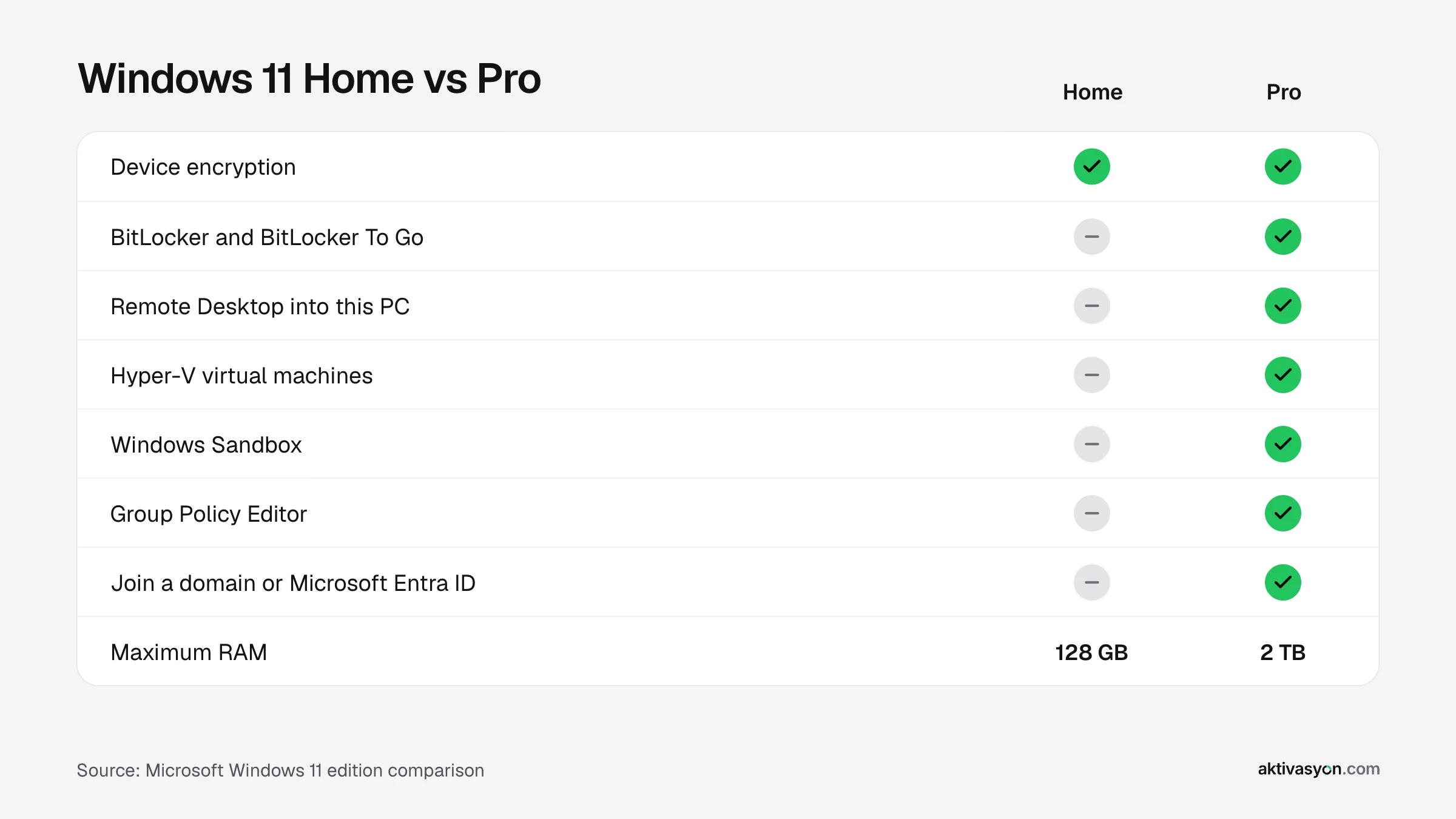
- Home is enough for: browsing, office work, gaming, school and media. Device encryption and Microsoft Defender are included in Home too.
- Pro is worth it if you need to: connect to the PC with Remote Desktop, encrypt drives and USB sticks with BitLocker, run Hyper-V virtual machines, use Windows Sandbox, manage settings with Group Policy, or join the PC to a company domain.
At the Microsoft Store the two editions are about $61 apart, so we recommend Pro only if you really need one of these features.
2. License Type: Retail, OEM and Upgrade
- Retail: the full retail license. At aktivasyon.com a Retail key is good for a single activation, so enter it after Windows setup and your drivers are finished.
- OEM: binds to the first PC it activates and activates again when you reinstall Windows on that same PC. It is the easier choice if you reset your PC now and then.
- Upgrade: if your PC already runs activated Windows 11 Home, an upgrade key is enough to move to Pro without touching your files.
None of these licenses expire. Windows 11 Home and Pro are one-time purchases, not subscriptions.
3. Where You Buy It
The same edition can cost very different amounts depending on the channel:
- Microsoft Store: the full list price, delivered as a direct download.
- A PC with Windows preinstalled: the license is included in the price of the computer and stays with that PC.
- Digital license sellers: deliver Retail and OEM keys digitally, usually far below the Microsoft Store price.
If you buy a key from a digital seller, check that the seller lists its terms and refund policy and states which license type you are getting. Stay away from listings that don't name the license type or promise things like "lifetime license for all your devices".
Which Windows 11 License Should You Buy?
| Your situation | Our suggestion |
|---|---|
| I run a licensed copy of Windows 10 | Upgrade for free, you don't need a new license |
| I built a home or gaming PC | Windows 11 Home |
| I use the PC for work and need remote access | Windows 11 Pro |
| My PC runs activated Home and I need Pro features | Home to Pro Upgrade |
| I reinstall Windows often | Choose the OEM license type |
You can compare every edition and license type on the Windows 11 licenses page.
After You Buy
Once you have your product key, go to Settings > System > Activation > Change product key to activate Windows in a few minutes. Before you buy, check that your PC supports Windows 11 with Microsoft's free PC Health Check app. Windows 11 needs TPM 2.0, UEFI with Secure Boot and a compatible 64-bit processor.
Frequently asked questions
How much does Windows 11 Home cost?
$139 at the Microsoft Store (October 26, 2026). Retail and OEM keys from digital license sellers usually cost much less.
How much does Windows 11 Pro cost?
$199.99 at the Microsoft Store (October 26, 2026). If your PC already runs activated Home, an upgrade costs less than a full Pro license.
Is the Windows 11 upgrade from Windows 10 still free?
Yes. If your PC runs a licensed copy of Windows 10 and meets the Windows 11 requirements, the upgrade through Windows Update is free and keeps your activation.
Does a Windows 11 license expire?
No. Windows 11 Home and Pro licenses never expire and there is no monthly or yearly fee. Don't confuse them with subscriptions such as Microsoft 365.
Why are some Windows 11 keys so cheap?
Most of the difference comes from the license type and the sales channel. The Microsoft Store sells at the full retail price, while digital sellers offer Retail and OEM keys at a lower cost. What matters is that the seller clearly states the license type and supports you if something goes wrong.
Do I need to reinstall Windows to upgrade from Home to Pro?
No. Enter a Pro or upgrade key on the **Settings > System > Activation** page and Windows restarts as Pro. Your files and apps are kept.