Windows 11 Home vs Pro: Differences and Which One to Buy
Windows 11 Home or Pro? Every real difference between the two editions, whether Pro is faster for gaming, what each costs and how to upgrade.
On this page
- Windows 11 Home vs Pro Comparison Table
- What Do the Pro Features Actually Do?
- BitLocker
- Remote Desktop
- Hyper-V and Windows Sandbox
- Group Policy and Domain Join
- Is Windows 11 Pro Better for Gaming?
- Is Windows 11 Pro Worth It?
- Setup Differences
- Which One Should You Buy?
- How to Upgrade Windows 11 Home to Pro
- Frequently asked questions
Quick answer: Windows 11 Home is enough for home, school and gaming. Windows 11 Pro adds BitLocker drive encryption, incoming Remote Desktop, Hyper-V virtual machines, Windows Sandbox, Group Policy and the ability to join a company domain. Gaming and everyday performance are the same on both.
Pick Pro only if you'll actually use one of those features. Below we go through every difference and tell you which edition fits which kind of user.
Windows 11 Home vs Pro Comparison Table
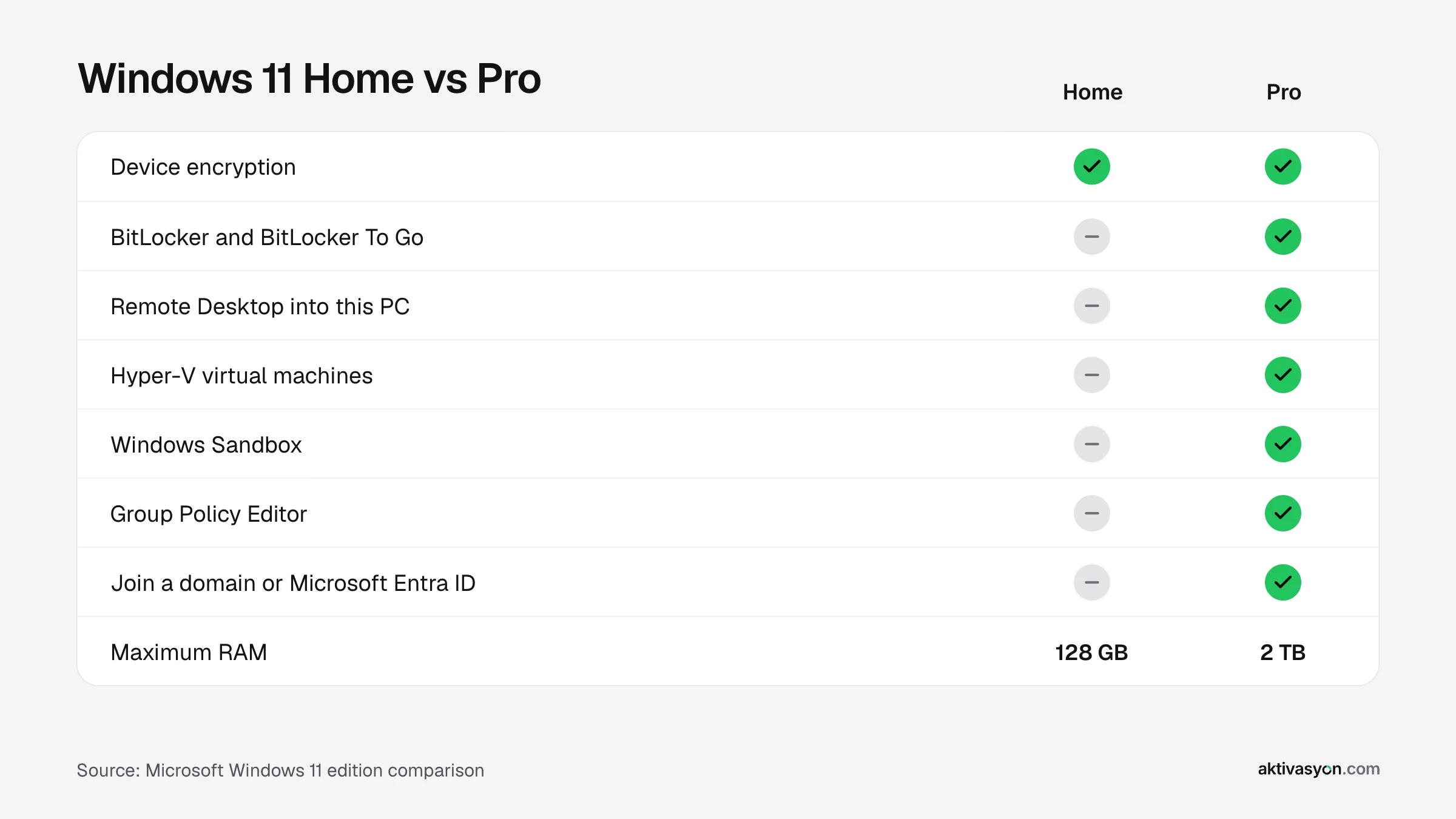
| Feature | Home | Pro |
|---|---|---|
| Microsoft Defender and firewall | Yes | Yes |
| Device encryption | Yes (on supported hardware) | Yes |
| BitLocker and BitLocker To Go | No | Yes |
| Remote Desktop into this PC | No (client only) | Yes |
| Hyper-V virtual machines | No | Yes |
| Windows Sandbox | No | Yes |
| Group Policy Editor | No | Yes |
| Join a domain or Microsoft Entra ID | No | Yes |
| Assigned Access (kiosk mode) | No | Yes |
| Maximum RAM | 128 GB | 2 TB |
| CPU support | 1 socket, 64 cores | 2 sockets, 128 cores |
| Microsoft Store price (October 26, 2026) | $139 | $199.99 |
What Do the Pro Features Actually Do?
BitLocker
BitLocker encrypts your drives and USB sticks. If your laptop is stolen, nobody can read the disk even after pulling it out. Home has automatic device encryption, but only on supported hardware, and it can't encrypt external drives or USB sticks.
Remote Desktop
Windows 11 Home can connect to other PCs with Remote Desktop, but nobody can connect into a Home PC. If you want to reach your home or office computer from somewhere else with Microsoft's built-in tool, you need Pro.
Hyper-V and Windows Sandbox
Hyper-V runs other operating systems inside Windows. Windows Sandbox opens a disposable copy of Windows where you can test a suspicious app without touching your real system. Both are useful for developers and anyone who tests software. Note that WSL for Linux and the Virtual Machine Platform also run on Home.
Group Policy and Domain Join
Group Policy lets you control hundreds of Windows settings from one place. Joining a domain or Microsoft Entra ID lets a company manage the PC centrally. If your work computer has to join a company network, Pro is required.
Is Windows 11 Pro Better for Gaming?
No. Games, DirectX 12, Game Mode, Auto HDR and the Xbox app are identical on Home and Pro. Pro's higher RAM and CPU limits don't matter on a normal PC either: 128 GB of RAM and 64 cores are far beyond almost any gaming rig.
Is Windows 11 Pro Worth It?
Pro costs about $61 more at the Microsoft Store. It's worth it if you:
- carry sensitive data on a laptop and want BitLocker on the drive and your USB sticks,
- want to Remote Desktop into your own PC,
- run virtual machines or test software in Windows Sandbox,
- need to join your PC to a work domain or manage it with Group Policy.
If none of these apply, Home gives you the same Windows for less.
Setup Differences
Both editions need an internet connection and an account during setup. Home is set up with a personal Microsoft account. Pro also offers Set up for work or school, which enrolls the PC straight into a company's management.
Which One Should You Buy?
| How you use your PC | Our pick |
|---|---|
| Browsing, office work, school, streaming | Windows 11 Home |
| Gaming | Windows 11 Home |
| Sensitive data on a laptop, drive and USB encryption | Windows 11 Pro |
| Remote access to your own PC | Windows 11 Pro |
| Software development, virtual machines, testing | Windows 11 Pro |
| You run Home and now need Pro features | Home to Pro Upgrade |
For full pricing see how much Windows 11 costs, and for license types read OEM vs retail vs digital license.
How to Upgrade Windows 11 Home to Pro
You don't need to reinstall. Go to Settings > System > Activation > Change product key and enter a Pro or upgrade key. Windows installs the Pro features and restarts, and your files and apps stay where they are. The full steps are in our guide on how to activate Windows 11.
Frequently asked questions
Is Windows 11 Pro faster than Home?
No. Performance is the same in games and everyday use. Pro only adds business and security features.
Does Windows 11 Home have BitLocker?
No, BitLocker is a Pro feature. Home has automatic device encryption on supported hardware, but it can't encrypt external drives or USB sticks.
Will I lose my files if I upgrade from Home to Pro?
No. When you enter an upgrade key, Windows adds the Pro features and restarts. Your files and apps are kept.
Can I go back from Pro to Home?
Not by changing the key. To go from Pro to Home you have to reinstall Windows with the Home edition.
Can I use Remote Desktop on Windows 11 Home?
You can connect from a Home PC to other computers, but you can't connect into a Home PC with Remote Desktop. That requires Pro.
Should students get Home or Pro?
Home is enough for most students. If your course involves virtual machines or test environments, such as software engineering, Pro makes life easier.